
Domains inside WebOps use two different status systems:
- Status
- DNS Status
Each one represents a different part of the domain setup process.
Understanding these statuses helps you know:
- when a domain is ready to connect
- when DNS is still processing
- why some actions may be unavailable
- when nameservers or DNS records can be managed
Domain Status vs DNS Status #
Status #
The main registration status of the domain itself.
Examples:
- Registered
- Pending
- Failed
DNS Status #
The DNS and connectivity status of the domain.
Examples:
- Active
- Propagating
- External
- Error
Both statuses appear inside the Domains Portfolio page.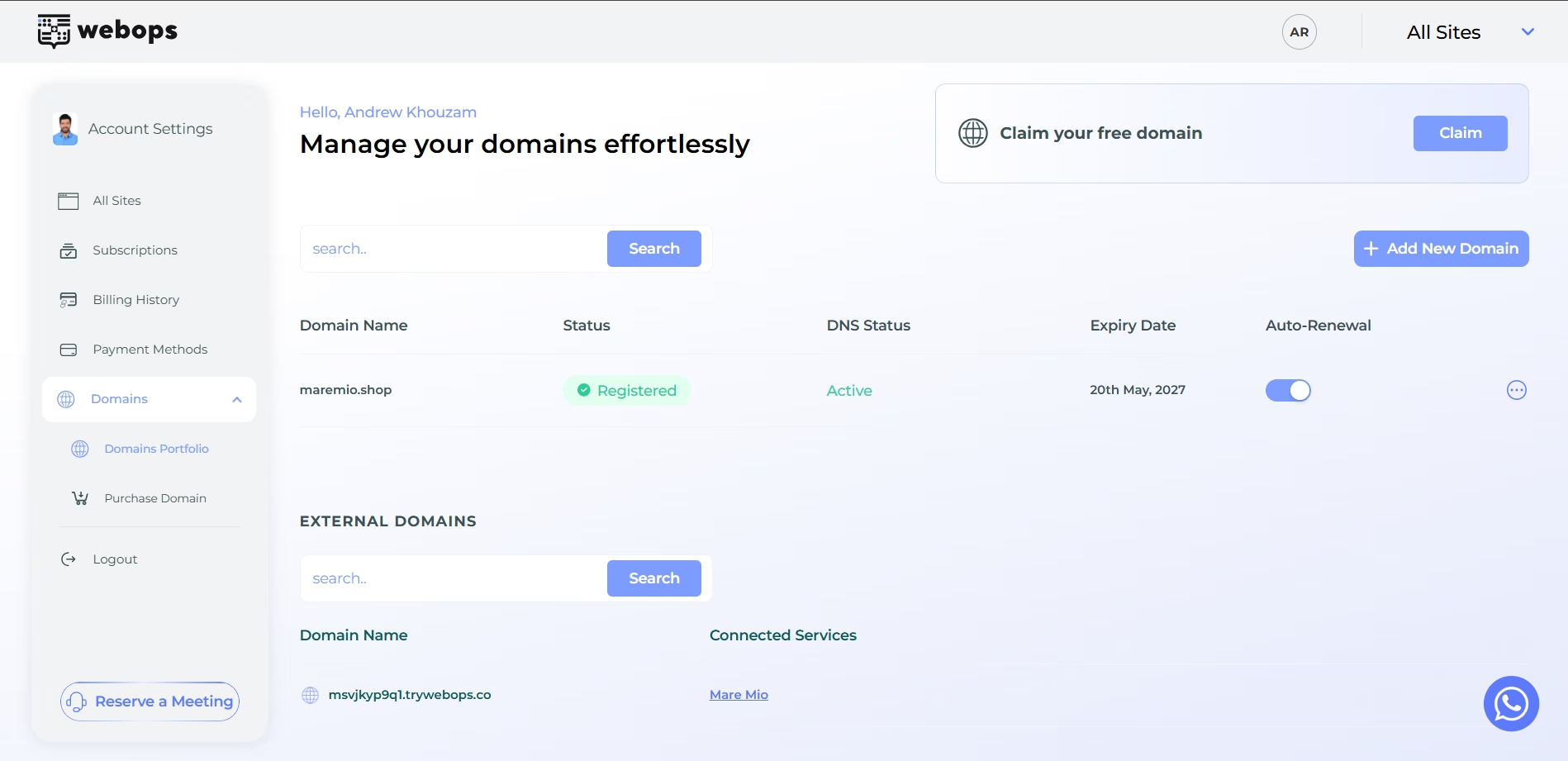
Domain Statuses #
Registered #
Meaning:
The domain registration was completed successfully.
What you can do:
- renew the domain
- manage the domain normally
Usually paired with DNS Status values such as:
- Active
- Propagating
- External
Pending #
Meaning:
The domain registration process is still being completed.
This status usually appears temporarily during registration processing.
During this stage, the domain is not fully registered to your account yet.
What you can do:
- no domain management actions are available yet
What is unavailable:
- Manage DNS
- Link to website
- Change nameservers
- Renew
Pending status usually disappears quickly once registration finishes.
Failed #
Meaning:
The registration process failed or requires attention.
This may happen because of:
- payment issues
- registry problems
- temporary provider issues
The domain was not registered successfully.
What you can do:
- no domain management actions are available
What is unavailable:
- Manage DNS
- Link to website
- Change nameservers
- Renew
If the issue continues, contact support.
DNS Statuses #
Active #
Meaning:
The domain is fully active and ready to use.
This is the normal operational state for domains using WebOps nameservers.
What you can do:
- Manage DNS
- Link to website
- Change nameservers
- Renew
Domains with Active DNS Status can be connected to websites normally.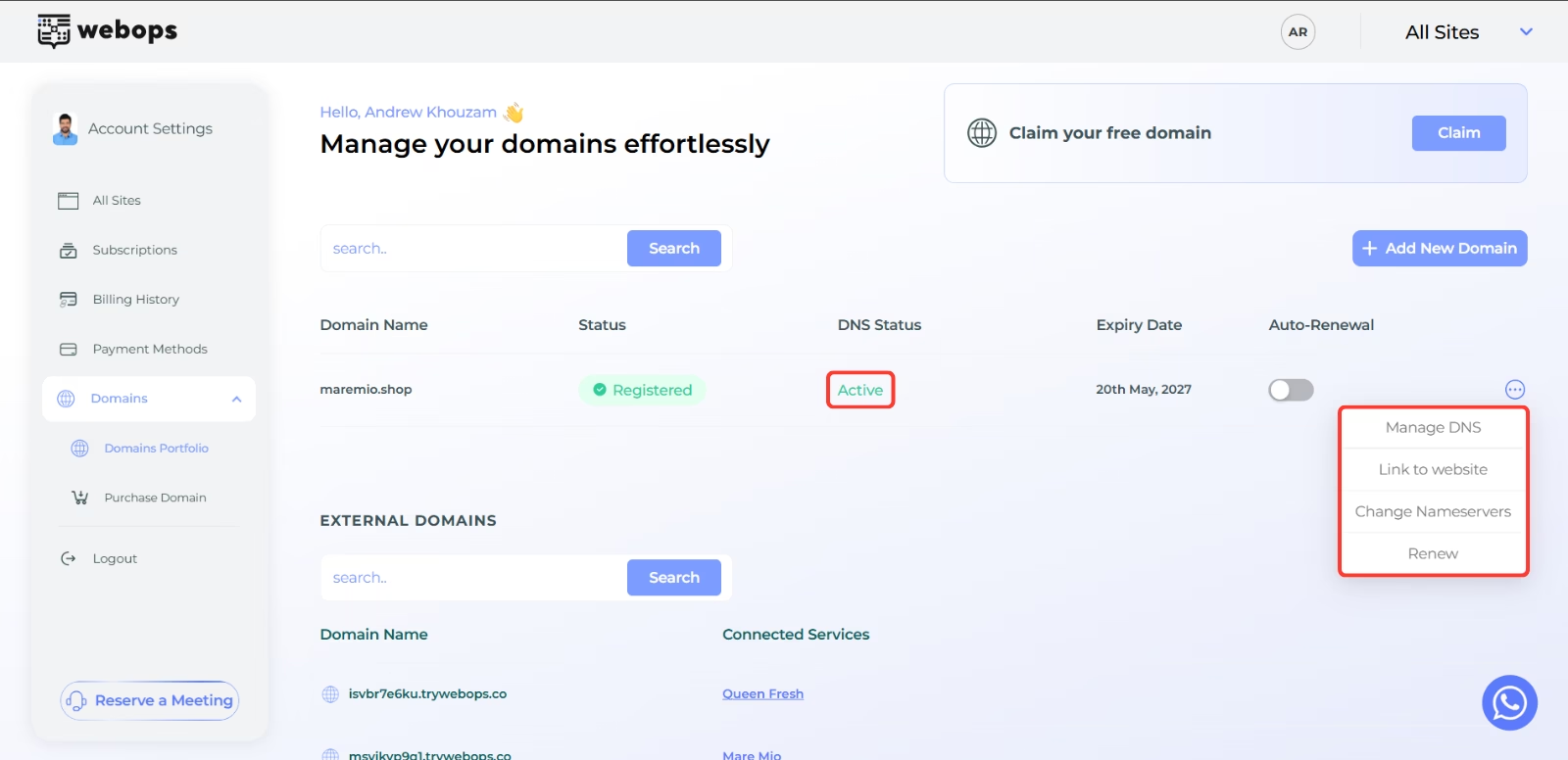
Propagating #
Meaning:
DNS setup is still processing globally.
This status usually appears after:
- purchasing a domain
- changing nameservers
- updating DNS configuration
What you can do:
- renew the domain only
What is unavailable:
- Manage DNS
- Link to website
- Change nameservers
DNS propagation may take several minutes or a few hours depending on the provider.
Pending #
Meaning:
DNS setup has started but is still waiting for processing.
This status appears temporarily and usually switches quickly to another DNS status.
What you can do:
- renew the domain only
What is unavailable:
- Manage DNS
- Link to website
- Change nameservers
External #
Meaning:
The domain is using external nameservers instead of WebOps nameservers.
This means DNS is managed outside WebOps.
What you can do:
- Change nameservers
- Renew
What is unavailable:
- Manage DNS
- Link to website
Domains using external nameservers cannot use WebOps DNS management tools.
Error #
Meaning:
The DNS setup process failed or requires attention.
This may happen because of:
- invalid nameservers
- incorrect DNS setup
- propagation failures
- provider issues
What you can do:
- Change nameservers
- Renew
What is unavailable:
- Manage DNS
- Link to website
If the problem continues, review your DNS setup or contact support.
Important Notes #
- DNS propagation may take several minutes or a few hours
- Domains cannot be linked until DNS Status becomes Active
- Domains using external nameservers cannot use WebOps DNS management
- Pending and Propagating statuses are usually temporary
- External domains appear separately inside the External Domains section